# Plugin README.md Documentation
Plugins can include a README.md file in the root directory to provide usage documentation. The system will automatically read this file and display its content on the plugin editing page, making it easy for developers to provide operation guides and other content for users.
Note
This feature is available in beikeshop v3.0.0.4 and beikeshop v2.0.0.27 and above.
# Feature Description
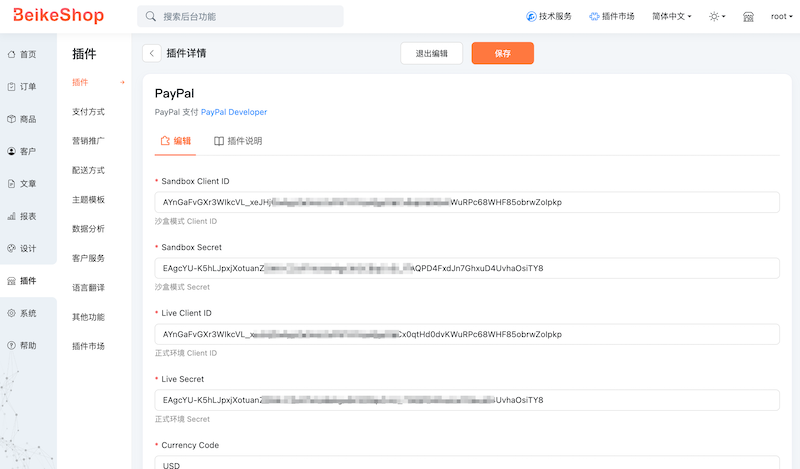
When a README.md file exists in the plugin root directory, the system will automatically parse its content and display it in the edit area of the plugin management page in the backend:
# Example Display
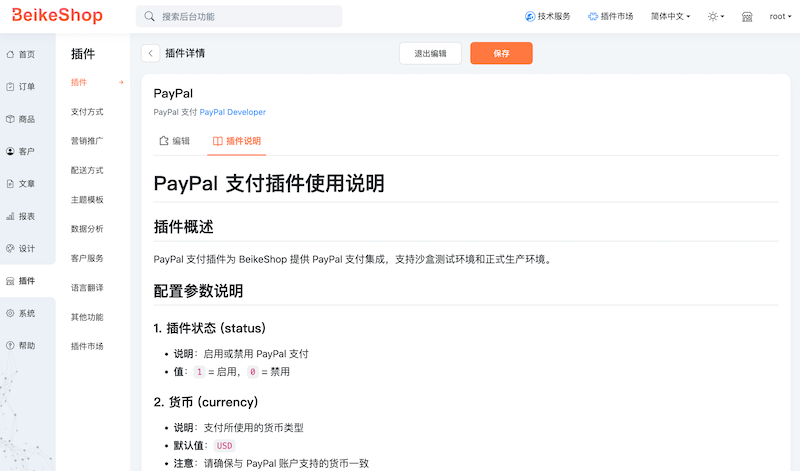
The following image shows how a plugin with a README.md file appears on the editing page:
# Usage
- Create a
README.mdfile in the plugin root directory - Write the plugin usage instructions using Markdown syntax
- Standard Markdown formatting is supported, including headings, lists, code blocks, links, etc.
# Example Content
# Plugin Name

This is the usage documentation for a feature plugin.

## Features

- Feature 1: Description
- Feature 2: Description
- Feature 3: Description

## Usage

1. First step
2. Second step
3. Third step

## Notes

- Note 1
- Note 2
# Important Notes
- The README.md file must be placed in the plugin root directory
- The filename must be
README.md(case-sensitive) - It is recommended to keep the content length reasonable, as overly long documentation may affect page layout
- Markdown syntax is supported, but complex HTML may not render properly